

The Lenovo ThinkCentre M720q is a compact, high-performance mini desktop designed for business use, offering robust processing power, security features, and easy manageability in a space-saving form factor.
The Lenovo ThinkCentre M720q is a compact, mini desktop that is built for businesses seeking a balance between power, space efficiency, and robust security features. Despite its small size, the M720q packs a punch with its solid hardware, making it suitable for a variety of professional tasks from office work to more demanding operations.
Design and Build Quality:
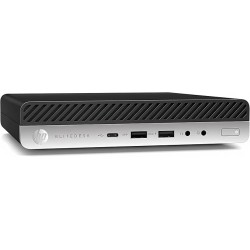
The ThinkCentre M720q stands out with its compact design, measuring around 7 inches in length and 1.5 inches in width, making it easy to place in tight workspaces, whether on a desk, behind a monitor, or mounted under a desk. Its black chassis is understated and professional, with the durability to withstand the rigors of everyday use. The case is sturdy, with ventilation to keep the system cool even during intensive tasks. The tool-less design allows for easy upgrades to RAM or storage, which is a plus for businesses looking to extend the longevity of their investment.
Performance:
Powered by the Intel Core i3 8th Gen processor, the M720q is designed for handling everyday business tasks like word processing, spreadsheets, web browsing, and email. The i3 processor, though not as powerful as the i5 or i7 variants, is capable of multitasking efficiently when paired with upgradable memory options.
It supports DDR4 RAM up to 32GB, which means it can be customized to meet different business needs. For standard configurations, 4GB or 8GB of RAM is typical, making it suitable for basic applications.
Storage options include M.2 PCIe SSDs and 2.5-inch SATA drives, offering both speed and capacity. The SSD provides faster boot times and smoother performance.
Connectivity and Ports:
The M720q offers a good range of connectivity options, including USB 3.1 ports, USB-C, HDMI, DisplayPort, and Ethernet. This variety of ports ensures compatibility with various peripherals and dual-monitor setups.
The front-facing ports are convenient for quickly plugging in USB devices, headphones, or a microphone.
It supports Wi-Fi and Bluetooth connectivity, making it easy to connect wireless keyboards, mice, and other accessories without occupying the USB ports.

Data sheet
The Lenovo ThinkCentre M720q is a compact, high-performance mini desktop designed for business use, offering robust processing power, security features, and easy manageability in a space-saving form factor.